I recently saw this commercial and was taken aback by the statistics Sprint shares on "what's happening now." To think that we have this kind of technology and some entity (be it person, company, government) can track it is both amazing and frightening all in one.

Showing posts with label business stuff. Show all posts
Showing posts with label business stuff. Show all posts
Friday, April 10, 2009


Thursday, April 9, 2009
Adding categories to a blogger tempate
 Who knew I'd become such a techie?! Since I started my business in 2005, I've learned so much about research, coding, editing, and maintaining my website and blog. Never in my wildest dreams did I think this would be a hat I'd wear in my business. What surprises me most is that I like it as much (sometimes more) then the heart of my business - designing and making bags and accessories. Come to think about it, I did love programming in high school. That was when we worked on Commodore computers and had dot matrix printers. Truly the stone ages of computer technology. Anyway, the point is that if I can do it, anyone can do it. So, I am going to start sharing just how I've figured things out.
First, Google is your friend! You can find anything on Google with a little tenacity. This is exactly how I figured out how to add categories to this blog. I did a simple search for "adding categories to blogger." I looked around each of the listings to find one that was right for me. Note: not all sites are good or helpful. The first one I came across wasn't. I've been coding long enough that I knew by looking at the code it wasn't right. So, I moved on and found this post on http://www.googletutor.com/. It worked like a charm as you can see on the left column of this blog. I now have categories so I can sort my STUFF! This will be helpful for myself and my readers. Yay, Google!
<------------------------
This is one of the easiest things to add to your template without seriously messing around with your coding. I'll save that for another day.
Here is how I added this feature by using the above tutorial:
1) Decide what you want your categories to be first. Write them down.
2) Go to this link and copy (right click) the html coding.
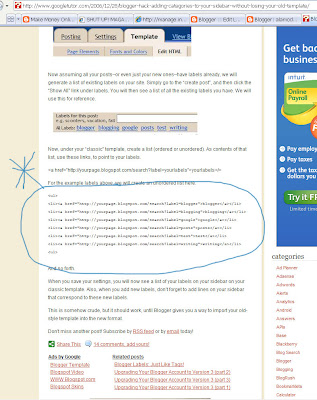
3) In your layout section of blogger, add a new gadget (html/java script).
2) Go to this link and copy (right click) the html coding.
3) In your layout section of blogger, add a new gadget (html/java script).
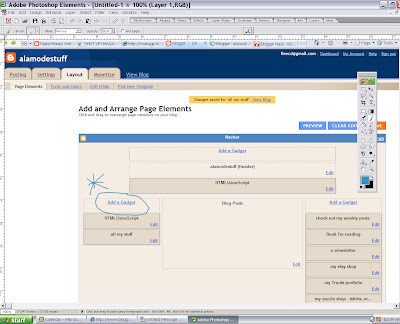
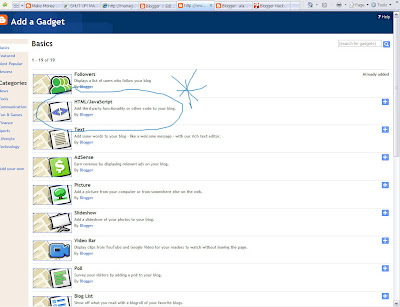
4) A new window will open. Paste the html coding into the content section. Note that you may also add a title for your categories. Mine is All My STUFF.
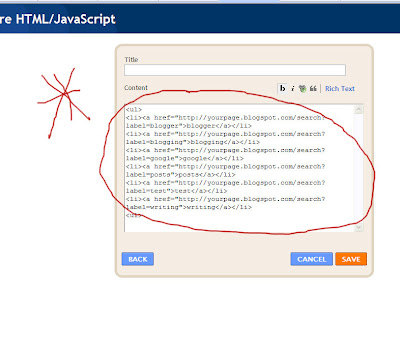
5) Change the coding (words to change are shown below in red) to reflect your blog information(words shown in blue). The example below is how I changed the coding for my own blog. The words in blue will be your own.
- .....yourpage.blogspot.com.......label=blogger">blogger
- ....alamodestuff.blogspot.com......label=home stuff">home stuff
6) You can add as many category listings as you like by simply copying the code.
7) Save and voila...you have categories for posts going forward.
8) On your posts, make sure to label it accordingly. You'll note that for this particular post, I've labeled it "computer stuff." You can put your post in multiple categories as well. Just be sure to use the exact wording so your posts will be categorized appropriately.
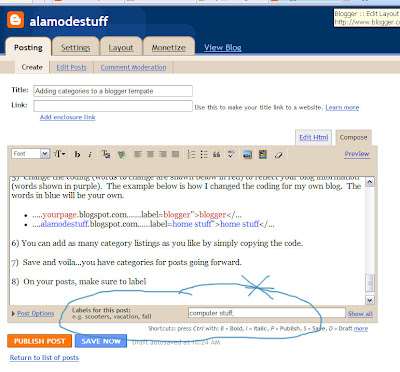
9) If you want to go back and put your older posts into categories, you'll have to edit and add your label to each older post individually and re-publish (click publish post). As long as you don't change the post date, each post will update and should appear in your selected category. I am going to do this over time but I tested it and it does work.
Give it a try. If you have questions, leave me a comment or email me. Since this isn't really manipulating the actual coding within your main blog directly (I'll get into that later), this is an easy way to begin enhancing your blog without having to worry about messing things up.
Thursday, March 20, 2008
Random Inspiration
Sometimes I lie in bed at night, my mind racing, with design ideas. It is really exciting to have those creative juices flowing. Of course, I always worry that inspiration won't return. I never know how or when I'll be inspired...or if the inspiration can be successfully translated.
I love walking the aisles at my local hardware (or big name hardware) stores. I'm there too often to admit, but I find myself looking at various items and rethinking their usefulness. Some time back, I picked up a carriage bolt and knew it would make a great handle for a bag. I then found copper pipe and thought the same. I love combining unexpected elements, particularly industrial elements with classic designs and materials.


I just love these bags! They are modern and tailored, comfortable to carry, and very functional.

They are great to carry in the evening but I also like throwing my wallet in one to run off to the store.
After making one last night, the shape brought me back to my childhood. I had a metallic purple, Schwinn bike with a flowered banana seat (I know I just dated myself). Of course, it had all the great accessories - handle bar tassels, spoke clackers, and a beautiful white, patent faux leather saddle bag. My new "hardware clutches" are shaped exactly like my white saddle bag!


Monday, March 17, 2008
Colors that make me smile!
 Some time ago, I came across this painting by Etsy artist, Carolyn of Crazyfunkycool. I marked it as a favorite. I was drawn to the colors and simplicity of the pear shape. Only today did I realize that the fabric I chose for spring/summer '08 is so similar to the painting. Clearly, the colors and form stuck in my head.
Thanks, Crazyfunkycool, for the inspiration! Check out her Etsy shop at http://www.crazyfunkycool.etsy.com/
The mini go tote - chartreuse/teal:

Sunday, March 16, 2008
A day of rest.

Am I alone in this? I actually have to tell myself to slow down and not work. I gave myself permission today to "rest" yet here I am blogging.
Well, if you are like me and need to be told..."Take the day off. Rest and re-boot!"
There, I said it and now I'm going to do it!
Saturday, March 15, 2008
What does it mean to be green?
 "Living green is about consuming less, sharing more and enjoying life," http://www.earthhour.org/.
 I try my best to do what I can to lessen my impact on the environment. I've started by making awareness a part of my family and daily life. I'm not perfect, but I really try to do what I can. Here are some ways that I incorporate "being green" into my business:
- I've tried to reduce paperwork by simply backing up my computer and printing less.
- I have a recycle bin for paper and cardboard in my studio/office.
- I reuse paper for notes or test prints.
- I use recycled paper (a bit more costly than regular paper).
- I've replaced light bulbs with energy efficient bulbs.
- I use remnant fabrics, post production materials, and industrial scraps all of which were slated for the landfill. Have you visited your local recycle center? Ours sells boxes (minimal cost) of scraps of all sorts. If you do any kind of mixed media work, its is awesome!
- I reuse packaging materials (padded envelopes, boxes, bubble wraps, etc.).
- I share resources, supplies, and equipment with friends who have similar businesses.
- I use one of my own bags (the beach bag pictured above) for shopping at the grocery store. I keep one in my car at all times. I do occasionally forget (and kick myself for it). But I am getting better.
I just signed up for Earth Hour (http://www.earthhour.org/). On March 29, 2008 at 8PM people all over the world are turning off their lights for 1 hour. Doesn't seem like much, but the impact is big. Check it out and get involved.
I'd love to hear what you do to be green. Leave comments and share!
Subscribe to:
Posts (Atom)
